Catalog & 3D Models
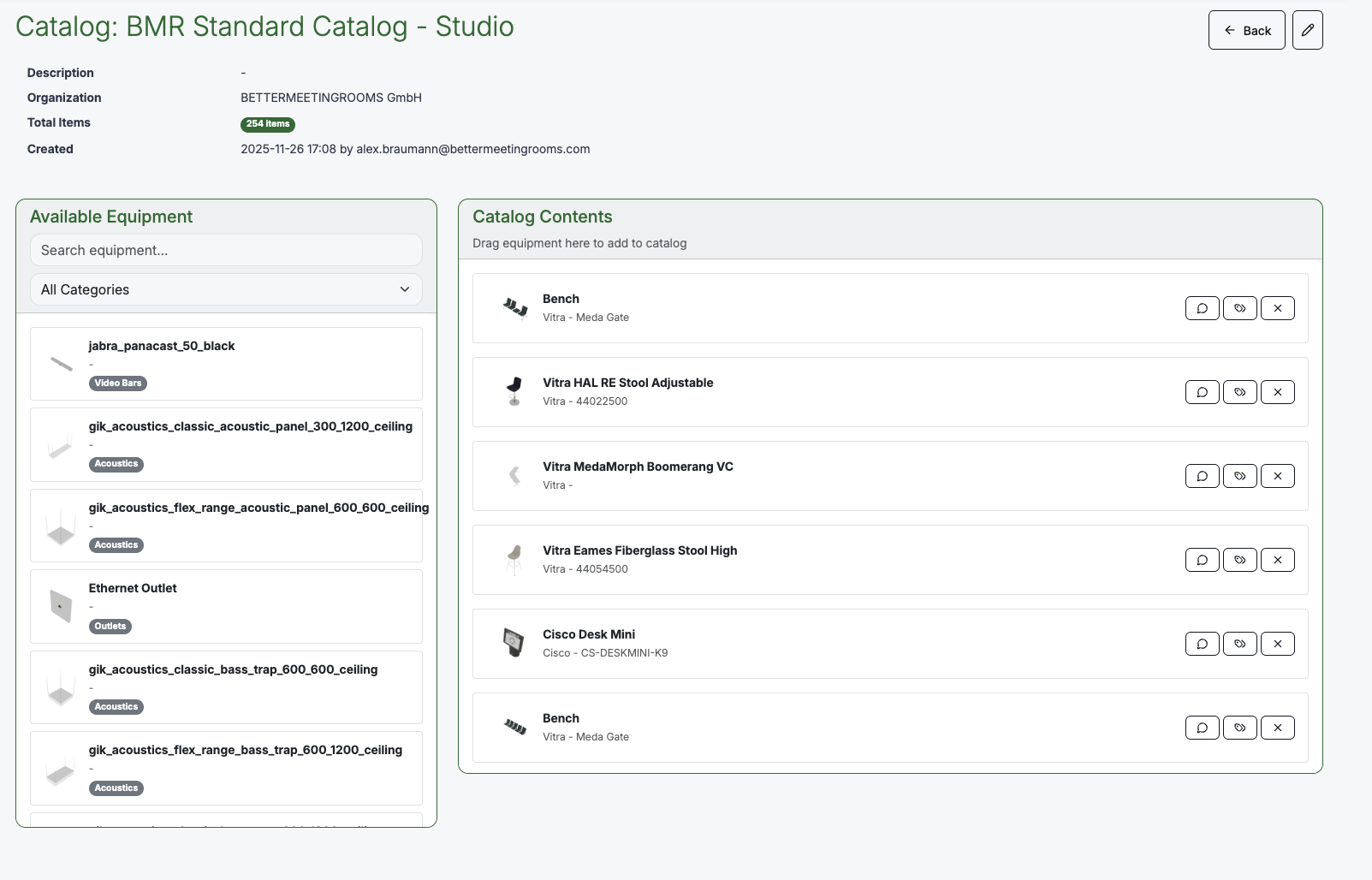
The Equipment Catalog is the central library of all items available for room design — from video bars and displays to chairs, tables, acoustic panels, and cable outlets. Every item in the catalog includes a 3D model and associated metadata, so it can be placed accurately in both BMR Studio and AR Design.
This section explains what the catalog is, what data is stored for each item, how those requirements differ by category, and the 3D model standards every model must meet.
All catalog items — and every field on them — are added and maintained by the BMR team. Customers don't add or edit items themselves. The pages below document what BMR stores and how to request an addition.
In this section
- Anatomy of a Catalog Item — every field stored on an item and why it matters
- Requirements by Category — what differs between a video collaboration device, an acoustic panel, furniture, and more
- 3D Model Standards — geometry, materials, and export rules for the model itself
- Ports, Devices & Configurator — placing ports and devices on the 3D model
- Requesting a Catalog Item — how a new item gets into the catalog
What the Catalog Contains
The catalog is a comprehensive database — not just a list of items, but a rich data layer that powers guidance and automation across the platform. Each catalog item includes:
- 3D model — a detailed model used for placement and visualisation in BMR Studio and AR Design
- Category — the type of equipment (e.g. Video Bars, Displays, Acoustics, Chairs, Tables, Outlets)
- Manufacturer and model — product identification (e.g. "Cisco Desk Mini", "Vitra HAL RE Stool")
- Dimensions and mounting — physical size, weight, and mounting requirements
- Acoustic properties — absorption coefficients and material characteristics for acoustic treatment items. This data enables the platform to recommend the right acoustic materials for a room based on the acoustic measurement results.
- Input/output specifications — connectors, ports, and signal types for each device. This is used to guide cable routing and ensure correct connections between devices in the design.
- Coverage data — camera field of view, microphone pickup range, speaker coverage area, and display visibility zones
All of this data works together to help users make informed decisions during design. When you place a camera, the platform knows its field of view. When you add an acoustic panel, the platform knows its absorption characteristics. When you connect devices, the platform knows which cables and ports are needed.
How the Catalog Is Used
The catalog is the shared foundation across several features:
| Feature | How it uses the catalog |
|---|---|
| BMR Studio | Browse and place items from the catalog into the 3D room design. Metadata drives coverage overlays, cable guidance, and placement rules. |
| AR Design | Select items from the catalog and position them in the physical room using augmented reality |
| Default Room Configuration | Define recommended equipment setups using catalog items, which then surface in BMR Studio's Guidelines panel with a one-click Place in room action |
| Cable Routing | Input/output specifications from the catalog determine which cables are needed and how devices connect. Outlets appear in the Cable Guide as connection points |
| Acoustic Recommender (coming soon) | Acoustic properties in the catalog enable automatic recommendations for acoustic treatment based on a room's measurement results |
Default Catalogs
BMR provides two standard catalogs, each designed for its specific use case:
| Catalog | Purpose |
|---|---|
| BMR Standard Catalog — Studio | Optimised for BMR Studio. Contains the full range of equipment with detailed 3D models for precise placement in the web-based designer. |
| BMR Standard Catalog — AR | Optimised for AR Design on iPhone and iPad. Contains models tuned for real-time augmented reality rendering. |
Both catalogs are maintained by BMR and are kept up to date with new equipment as it becomes available.
Catalogs and Organisations
Catalogs are assigned at the organisation level. An organisation can have one or more catalogs, and users within that organisation can access items from any assigned catalog when designing rooms.
This means:
- Different organisations can have different catalogs tailored to their equipment standards
- An organisation can have both the Studio and AR catalogs assigned simultaneously
- Items can be added or removed from a catalog to match the organisation's approved equipment list
Managing Catalogs
Catalog management is currently handled by the BMR team. This includes:
- Adding and removing equipment items
- Uploading and updating 3D models
- Editing metadata (manufacturer, model, category, specifications)
- Assigning catalogs to organisations
If you need items added to or removed from your catalog, send the request via Send Feedback — Report an Issue in the Web header, or Send Feedback under Settings in BMR Mobile. The team monitors this channel actively. See Requesting a Catalog Item for the full flow.
Preparing a 3D model for the catalog? Follow the 3D Model Standards.
Self-service catalog management for organisation admins is on the roadmap. This will allow admins to customise their own catalogs — adding approved equipment, removing items that don't meet standards, and managing metadata directly.